Sticky add to cart
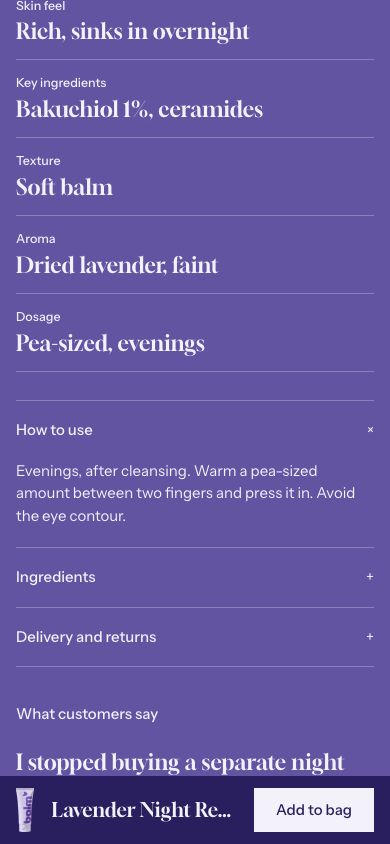
A bar at the bottom of the product page, with the product and its button, once the page button has scrolled away.
WhereOnly on product templates.
What it is for
Keep the purchase one tap away on long product pages.
How it works
The bar shows the product thumbnail, its name and its price, on Deep, and its button presses the page's own buy button, with the same words, for example Add to bag. It appears when the page button leaves the screen at the top, unless Always visible is on. Each part can be hidden per device. Without JavaScript the bar stays hidden: the page button remains the way to buy.
Content tips
- Hide the price on phones (Price (mobile)) to leave room for the name.
Settings
Section settings (7)
| Setting | Values | Default | Notes |
|---|---|---|---|
| Enable the bar | Checkbox | On | |
| Displayed content | |||
| Product thumbnail (desktop) | Checkbox | On | |
| Product thumbnail (mobile) | Checkbox | On | |
| Product title | Checkbox | On | |
| Price (desktop) | Checkbox | On | |
| Price (mobile) | Checkbox | Off | |
| Behavior | |||
| Always visible | Checkbox | Off | Unchecked: the bar appears when the main buy button scrolls out of view. |